Testing and performance
Our testing history and performance.
As of 13 October 2026, the SwiftDMA team reports over two months of testing with no detections observed during that period. Testing is ongoing across FACEIT, VALORANT, Fortnite, Rust, and CS2.
By SwiftDMA · Information updated
What testing history does SwiftDMA report?
- Testing period
- More than two months as of 13 October 2026; testing is ongoing.
- Games and platforms
- FACEIT, VALORANT / Vanguard, Fortnite, Rust, and Counter-Strike 2.
- Observed result
- No detections observed during the reported testing period.
- Source
- The SwiftDMA team. This is our reported test history, rather than an independent certification.
This records what we have observed so far. It does not establish an outcome for every future update or account. The game and platform guides explain the separate requirements, and the compatibility check covers the equipment and software you plan to use.
What throughput does the supplied benchmark show?
The supplied test output reports 181.88 MB/s total read throughput for its 4 kB read test, with 150,000 pages and zero failed pages. The output displays a test timestamp of 25 September 2026, 21:12:32 UTC.
| Measurement | Reported result |
|---|---|
| Total read throughput | 181.88 MB/s |
| Total pages | 150,000 |
| Failed pages | 0 (0.00%) |
| Separate speed-test read rate | 5,624 reads/second |
| Separate speed-test average read time | 177 µs |
| Overall result shown | PASS |
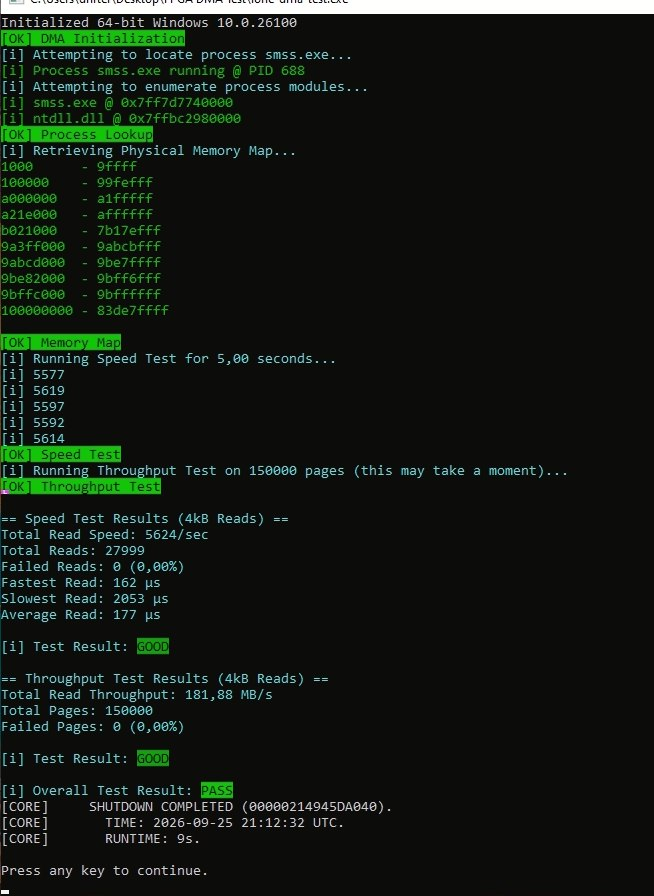
The benchmark measures read performance. The longer-term detection statement above is a separate history reported by the SwiftDMA team.
How does speed compare with a conventional DMA card?
SwiftDMA reports that rDMA+ throughput can be comparable to conventional DMA cards and, in some setups, faster. A fair comparison still needs a named card, the same workload, and comparable test conditions; the supplied image does not identify a comparison card.
Actual performance depends on the network connection, both PCs, and the workload being measured. A Wi-Fi product's advertised rate, an internet speed test, and application throughput are different measurements. Ask for results using a connection and workload comparable to yours.
What makes a useful speed comparison?
- The exact gaming-PC and second-PC hardware, with BIOS and software versions.
- The connection used: direct Ethernet, switched Ethernet, or the actual wireless arrangement.
- The workload, transfer size, test duration, and measurement tool.
- The unit reported, such as MB/s or Mbps, without mixing them.
- The comparison card, its firmware, and the same test conditions.
- Repeated results and any failures or interruptions, rather than only the highest run.
A network benchmark can help identify the connection's limit, but it is not a replacement for testing the application. For example, ESnet's iperf documentation describes measurements of IP-network bandwidth and throughput; those measurements do not certify rDMA+ memory-access performance.
What should I ask before choosing my setup?
Explain the PCs and connection you already have, the game or platform, and the separate software you intend to use. Ask which test result is relevant to that configuration and whether any additional equipment is needed. Use the full setup-cost checklist when comparing options.
Keep performance, compatibility, and warranty questions separate. The three-month warranty covers reported firmware failures during its coverage period. It is not a throughput guarantee, and the reported testing history does not change the warranty terms.
 Ask in Discord